
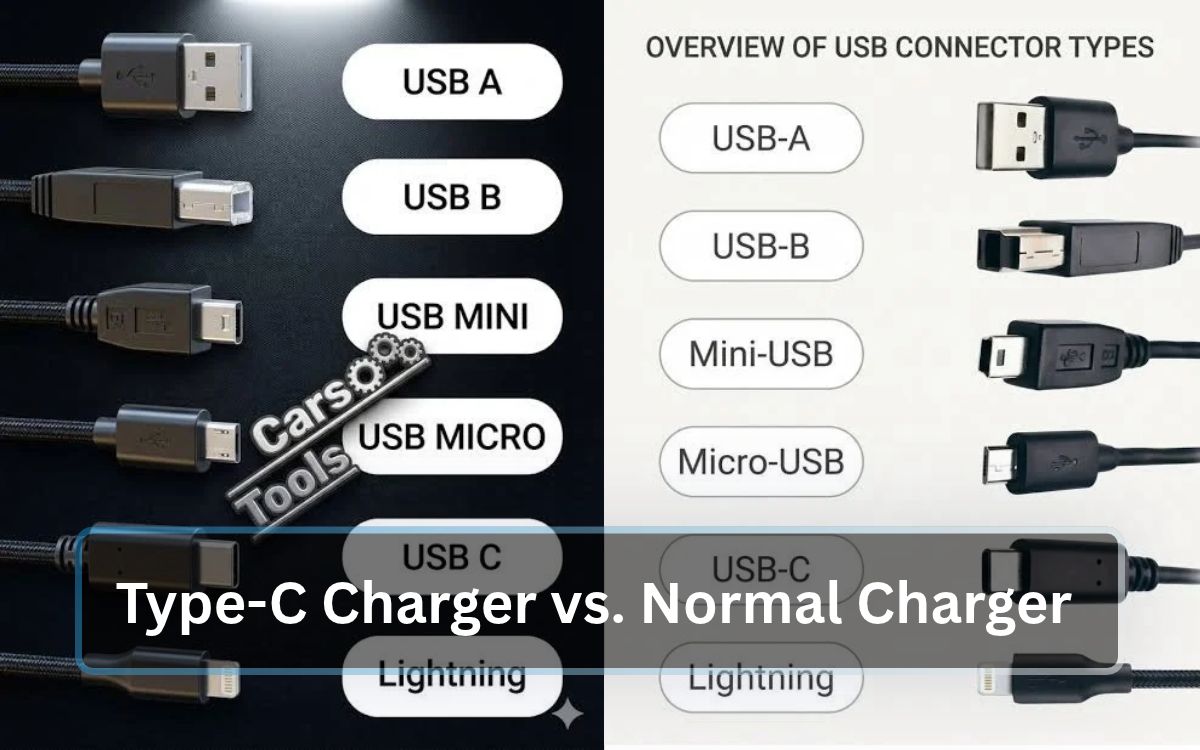
Choosing the right phone charger is essential for convenient and reliable charging. As USB Type-C becomes increasingly popular in modern smartphones, many people want to understand how it compares with a traditional charger. Although both options can charge electronic devices, they differ in connector design, charging capabilities, compatibility, and convenience.
Before purchasing a new charger, it is worth understanding what each type offers. The right choice depends on your smartphone model, charging requirements, budget, and the accessories you already own.
In this article, we will explore the differences between Type-C chargers and normal chargers, compare their performance, discuss their advantages and disadvantages, and help you decide which one suits your needs.
What Is a Type-C Charger?
A Type-C charger uses a USB Type-C connector to deliver power to compatible electronic devices. Its compact, oval-shaped design allows the cable to connect in either direction, making it easier to use than connectors that require a particular orientation.
USB-C is now found in many smartphones, tablets, laptops, headphones, and other electronic products. Depending on the specifications of the charger and connected device, it can support ordinary charging, higher-power charging, and data transfer.
Another useful feature is its versatility. A compatible USB-C power adapter may work with several devices, reducing the need to purchase separate chargers for every product.
However, the presence of a USB-C port does not necessarily mean that a device will charge quickly. Charging performance depends on the power adapter, cable, phone, and supported charging standards.
Main Advantages of a Type-C Charger
- Easy connection: The reversible plug works regardless of its orientation.
- Modern charging support: Compatible equipment can use technologies such as USB Power Delivery.
- Device flexibility: USB-C is used in many different categories of electronics.
- Convenient cable management: One suitable cable type may serve several compatible devices.
- Additional functionality: Certain USB-C cables support data transfer alongside charging.
What Is a Normal Charger?
A normal charger generally refers to a traditional phone-charging setup, commonly featuring a USB-A power adapter and a Micro-USB cable. The term can also describe other older charging arrangements.
These chargers remain useful for older smartphones and electronic accessories that have compatible charging ports. They are often inexpensive, readily available, and sufficient for everyday charging.
The performance of a traditional charger depends on its power rating, cable quality, connector, and supported charging technology. Some USB-A chargers also offer fast charging, so they should not automatically be considered slower than every USB-C charger.
Main Advantages of a Normal Charger
- Budget-friendly choices: Many traditional charging accessories are available at low prices.
- Suitable for older devices: They can serve phones and accessories with compatible ports.
- Easy availability: USB-A adapters and traditional cables are still widely used.
- Practical for everyday charging: A suitable adapter can provide reliable power.
- Useful for existing equipment: You may not need to replace a charger that already meets your device’s requirements.
Type-C Charger vs Normal Charger: A Comparison
USB-C and traditional charging setups have different characteristics. The table below summarizes the main points to consider before choosing one.
| Feature | Type-C Charger | Normal Charger |
|---|---|---|
| Connector design | Reversible USB-C plug | Often USB-A with Micro-USB |
| Ease of connection | Can be inserted either way | Depends on the connector |
| Charging capability | Supports various power levels | Also varies by adapter |
| Fast charging | Available with compatible equipment | Available on some models |
| Device support | Common among modern electronics | Often used with older devices |
| Data transfer | Depends on cable and device | Depends on cable and device |
| Price | Available at different price levels | Often affordable |
| Everyday use | Convenient for newer devices | Practical for compatible older devices |
1. Charging Speed: Which Charger Performs Better?
Charging speed is an important consideration when selecting a phone charger. Many modern USB-C charging systems support technologies that deliver more power than basic charging adapters.
For example, USB Power Delivery allows compatible chargers and devices to negotiate an appropriate power level. Some smartphone brands also use their own fast-charging systems, which may require specific adapters or cables to achieve maximum speed.
Nevertheless, USB-C alone does not guarantee faster charging. A basic USB-C adapter may charge a phone more slowly than a powerful, compatible USB-A charger.
Imagine that a smartphone supports charging at up to 33 watts. A compatible adapter and cable designed for the phone’s charging system may provide faster charging than a basic 5-watt adapter. If the phone does not support the charger’s charging technology, however, it may not reach the advertised charging speed.
Before purchasing a fast charger, consider the following:
- Check the maximum charging power supported by your smartphone.
- Confirm that the adapter supports the appropriate charging standard.
- Select a cable rated for the required power.
- Check whether your phone needs a manufacturer-specific charging solution.
Which is better? USB-C is often a practical option for modern fast charging, but the specifications of the complete charging setup determine the actual result.
2. Performance and Smartphone Battery Health
A charger should provide suitable power without creating unnecessary heat or introducing electrical risks. Both USB-C and traditional chargers can perform well when they are compatible with the phone and manufactured to appropriate safety standards.
Battery longevity depends on several factors, including temperature, charging habits, battery age, and the phone’s internal charging management. Changing from a traditional connector to USB-C does not automatically make a battery last longer.
Similarly, a properly designed traditional charger does not automatically harm a smartphone’s battery simply because it uses an older connector.
To maintain good charging habits, follow these recommendations:
- Purchase chargers from reputable manufacturers or authorized sellers.
- Avoid cables with exposed wires, damaged plugs, or loose connections.
- Keep the phone and charger away from excessive heat.
- Stop using accessories that become unusually hot or show signs of damage.
- Follow the charging instructions provided by your phone manufacturer.
Which is better? Neither connector automatically offers better battery health. Compatibility, product quality, and temperature management are more important considerations.
3. Compatibility: Which Charger Works With Your Phone?
Not every charging cable fits every smartphone. Checking the charging port is therefore one of the most important steps before buying a new charger.
Many modern Android phones use USB-C, while certain older models use Micro-USB. Apple devices also vary by generation: older iPhones use Lightning, whereas newer models use USB-C.
A charger with a USB-C output may work with multiple compatible devices, but you must use the correct cable for the device’s port. Charging speed may also differ between phones, even when the same adapter is used.
Traditional USB-A adapters remain useful for compatible accessories and older devices. However, you may need a different cable or adapter to connect one to a newer phone.
Before purchasing, check:
- The charging port on your smartphone.
- The connector required by the cable.
- The power output supported by your device.
- Whether your phone requires a particular fast-charging standard.
Which is better? USB-C is a convenient choice for many modern devices, while traditional chargers remain useful for products designed around older connections.
4. Price and Availability
Price can influence which charger you choose. Traditional USB-A adapters and Micro-USB cables are often affordable, particularly if you only need a basic charging solution for an older device.
USB-C chargers are available in a broad range of prices. Basic models may be inexpensive, while higher-power adapters with multiple ports or advanced charging features can cost more.
A higher price does not automatically mean better quality. When comparing products, examine their specifications, manufacturer reputation, supported charging standards, and safety features.
It is also worth considering long-term usefulness. If most of your electronic devices use USB-C, purchasing a suitable USB-C adapter may help reduce the number of different chargers you need.
Which is better? Traditional chargers may be economical when you already own compatible devices. USB-C can be a worthwhile investment if you want a charging solution for modern electronics.
5. Convenience and Everyday Use
One noticeable difference between these charging options is how the cable connects to the device.
The USB-C plug is reversible, so it can be inserted without checking which side faces upward. By comparison, a Micro-USB plug has a specific orientation and must be aligned correctly.
USB-C is also widely used across different types of electronic products. If your phone, tablet, and other accessories support USB-C, you may be able to use fewer cable types.
However, not every USB-C cable has identical capabilities. Some support higher charging power or faster data transfer than others. Selecting a cable suitable for your intended use remains important.
Which is better? USB-C generally provides a more convenient experience, particularly for people who regularly charge several modern devices.
6. Is a Type-C Charger Safe for Every Smartphone?
A USB-C charger is not automatically suitable for every phone. The connector, cable, supported power level, and charging technology must all be considered.
For instance, a phone with a Micro-USB port cannot accept a USB-C plug directly. You would need an appropriate cable or compatible adapter to connect it.
Many reputable USB-C power adapters are designed to work with multiple compatible devices. The phone and charger coordinate the power delivery, but the charging speed may vary depending on their capabilities.
For safer charging, choose products from reliable manufacturers and avoid damaged, counterfeit, or poorly made accessories. Never force a connector into a charging port.
If your phone supports a specific fast-charging system, check the manufacturer’s recommendations before buying a replacement adapter.
Pros and Cons of a Type-C Charger
Pros
- Reversible design makes connecting the cable easier.
- Can support modern fast-charging technologies.
- Suitable for many current smartphones, tablets, and other electronics.
- May reduce the need for multiple cable types.
- Compatible cables can provide both power and data connectivity.
Cons
- Charging speed depends on the adapter, cable, and device.
- Some advanced charging adapters cost more than basic alternatives.
- Maximum charging speed may require a particular charging standard.
- USB-C cables can differ significantly in their capabilities.
- Older devices may need a different cable or suitable adapter.
Pros and Cons of a Normal Charger
Pros
- Many options are affordable.
- Suitable for compatible older smartphones and accessories.
- Can provide dependable charging for everyday needs.
- Existing USB-A adapters may remain useful for years.
- Some traditional chargers support fast-charging technologies.
Cons
- Micro-USB connectors require a specific insertion direction.
- Basic adapters may provide limited charging power.
- Older accessories may not support newer charging features.
- Different devices may require different cables.
- Compatibility with newer phones depends on the available ports and charging standards.
Which Charger Should You Choose?
The right charger depends on the devices you own, your charging requirements, and your budget.
Choose a Type-C Charger If:
- Your smartphone has a USB-C charging port.
- You want to use a compatible modern fast-charging system.
- Several of your electronic devices support USB-C.
- You prefer a connector that is easy to plug in.
- You want a versatile charging accessory for future devices.
Choose a Normal Charger If:
- Your phone uses a compatible older connector.
- You already own a reliable charger that meets your requirements.
- You need an economical charging option for an older device.
- Your charging needs are basic, and your current adapter works properly.
If you are buying a new charger, do not select one based on connector type or advertised wattage alone. Check your smartphone’s specifications and make sure the charger supports the appropriate charging technology.
Frequently Asked Questions
1. Does a Type-C charger charge a phone faster?
It can, provided the smartphone, adapter, and cable support a compatible fast-charging system. However, some traditional USB-A chargers also offer fast charging, so the connector alone does not determine speed.
2. Can I use a Type-C charger with an older smartphone?
Yes, if you use a compatible cable or adapter for the phone’s charging port. Whether the phone charges quickly depends on the charging specifications of the device and accessories.
3. Will a Type-C charger damage my phone’s battery?
A reputable charger that is compatible with your phone should not damage the battery simply because it uses USB-C. Excessive heat, damaged cables, and low-quality charging accessories are more important concerns.
4. Is a charger with more watts always better?
Not necessarily. A charger with a higher maximum wattage does not force a compatible phone to draw all of that power. The phone’s supported charging system determines how much power it accepts.
5. Can I use the same USB-C charger for my phone and laptop?
Sometimes. Many phones and laptops support USB-C charging, but their power requirements may be different. Check the laptop’s required power, the adapter’s output, and the cable’s rating before using the same charger.
6. Which charger is more suitable for long-term use?
A reputable USB-C charger can be a practical choice if your devices support USB-C, thanks to its widespread use in modern electronics. For older devices, a reliable charger with the correct connector and specifications may remain the better option.
7. Should I replace my normal charger with a Type-C charger?
You do not necessarily need to replace a working charger. Consider upgrading if your current adapter is damaged, your new phone requires a different connection, or you want charging features that your existing equipment cannot provide.
Final Verdict: Type-C Charger vs Normal Charger
When comparing Type-C chargers with normal chargers, USB-C offers several practical advantages for modern electronics. Its reversible connector, broad compatibility across newer devices, and support for advanced charging technologies make it a convenient option for everyday use.
Traditional chargers still have a place, especially for older smartphones and accessories. A good-quality adapter that meets your device’s requirements can remain a reliable choice without requiring an unnecessary upgrade.
Ultimately, the best charger is not simply the one with the newest connector or the highest wattage. It is the one that matches your phone’s charging port, power requirements, and supported charging technology.